



Virtus & Safe Environment Compliance
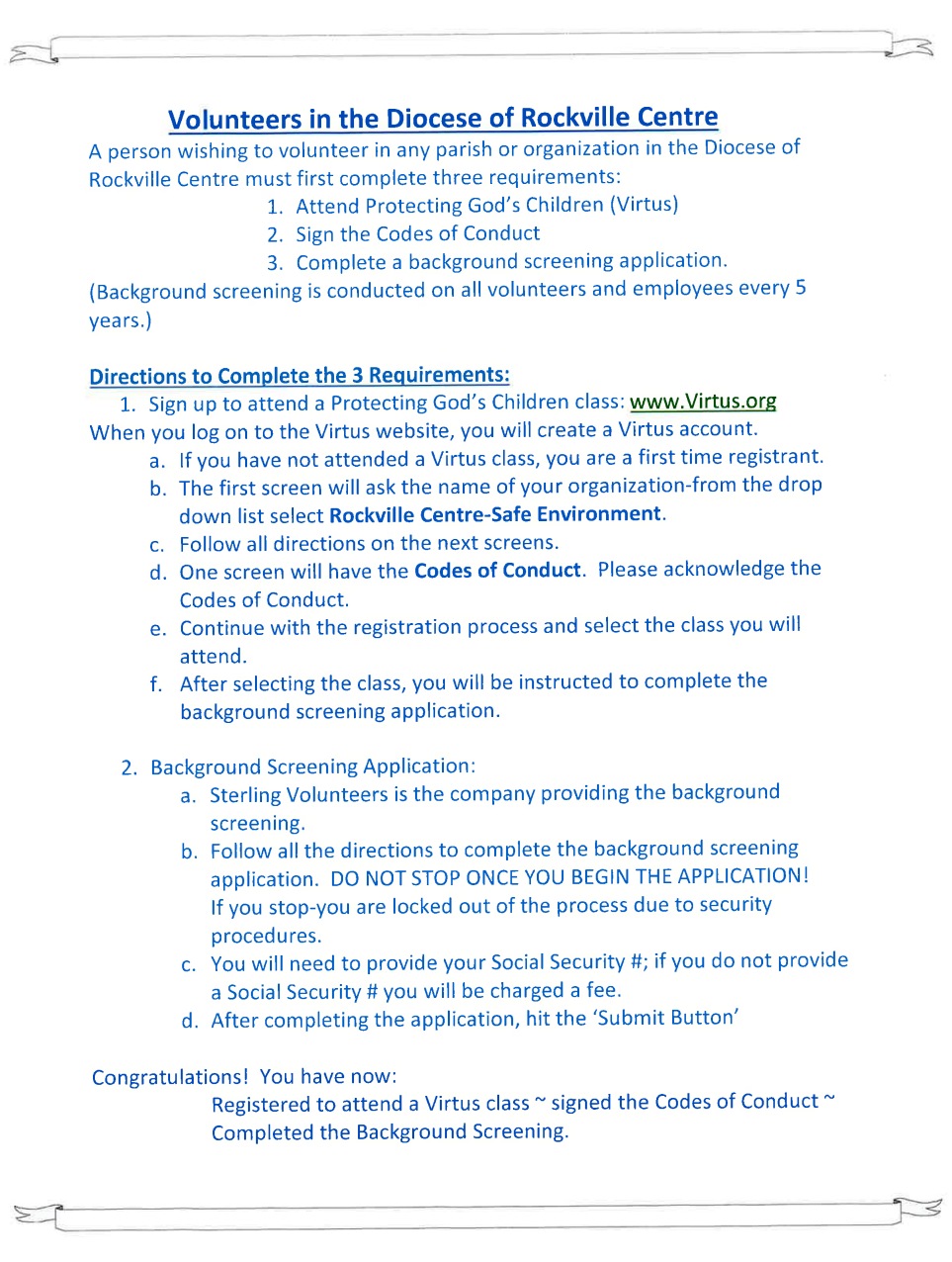
The Charter for the Protection of Children and Young People (The Charter) promulgated by the Bishops of the United States in 2002 outlines specific practices and guidelines providing standards of safety in parishes and dioceses throughout the United States. As directed in The Charter, the Diocese of Rockville Centre requires all employees, clergy, and volunteers to complete the following requirements within seven days of employment or thirty days of volunteering and making your Virtus Online account:
- Attend a Virtus: Protecting God’s Children for Adults seminar (this is a LIVE, three-hour, interactive workshop with facilitation that is done in person)
- Electronically acknowledge the Diocesan Code of Conduct, which is provided during the Virtus registration process.
- Follow the instructions to complete the Sterling Volunteers background screening application offered during the Virtus registration process (currently for volunteers only).
To begin the process, register at www.virtus.org for a LIVE workshop and create a Virtus account. To do this, you MUST have:
- an email you can readily access that is unique to you (e.g. not shared with someone else who is also registered/registering for Virtus training).
- a government ID, such as a driver's license
- and your social security number for the background screening portion.
Starting the process without one or more of these will prevent you from completing registration resulting in issues in your account, which will require resolution before you can start in your role.
**Please use a PC/Tablet to Register**
It is possible to register with a smartphone, but this is more difficult as the websites are not optimized for mobile use. It is further recommended that you do this in one sitting, which can take 10-30 minutes depending on the data you input.
IF YOU HAVE ALL OF THE ABOVE YOU MAY PROCEED WITH THE FOLLOWING STEPS:
1. Go to www.virtus.org and select "First-time Registrant"
o If you already have an account, this is where you can also sign in and access it.
o If you are unsure if you have an account, please contact the Virtus helpdesk at 1-888-847-8870 for assistance before proceeding.
2. Then click "begin the registration process"
3. Select organization via the drop-down menu -- For all parish volunteers the organization is "Rockville Centre, NY - Safe Environment (Diocese)"
4. Select "No" to the question, "Have you previously registered with VIRTUS Online?"
o If your answer is yes, you must recover your original login and should not proceed unless told to do so by a parish or diocesan Virtus coordinator
5. Now you will be prompted to create a user ID and password.
o It is recommended that you make a secure password of at least 8 characters with at least one capital letter, one lowercase, one number, and one special character.
6. Now you will fill out your profile. Answer the questions/fields to the best of your ability.
o Have your ID handy as you will need to enter the information as it appears on your government issued ID.
o Make sure all contact information, especially your EMAIL, is 100% correct. You're email must also be unique to you. This email becomes linked to your background check, so make sure it is also an email you wish to be associated with that.
o In the role/title section, please be specific (e.g. do not just state "volunteer," but state in which area, such as, catechist, coach, usher, etc.)
o Please include all parishes/diocesan entities in which you will be volunteering beginning with your primary one.
o During the process you will also have to digitally acknowledge one or two codes of conduct, depending on your role. It is recommended that you also download, print, and review them asap.
o If asked, make sure to check off that you will be working with minors if you will be (religious ed catechists and CYO coaches must check yes for this).
7. At the end of making your profile, you will select which Virtus session you would like to attend
o Please make sure to see if there are any notes (like session conducted in another language) before committing to a date and location
o You do NOT have to register for a session being conducted in the parish in which you plan to volunteer.
o If you do not know which session to attend at this time, pick one that is your "best maybe," as not selecting a workshop at time of registration can be problematic and will interrupt the rest of the process.
§ You can always log into your Virtus account and change your selected workshop via the "Training" tab in the upper left corner of the webpage.
8. Once you register for a Virtus session, you will be prompted to proceed to the Background Screening Platform (Sterling Volunteers)
o Your email will be carried over from the Virtus application and you will need to create another account with this email and a new password - in this case the password you choose must be secure.
o You may have to access your email to verify your new account before proceeding. You will be notified if you need to do this.
§ If so, click the verification link in your email and login with your new Sterling account on the page that loads.
o Once logged in, follow the prompts to include your name, social security number, contact information, and current and previous addresses.
o Once you have done this, you will be invited to upload more information. This is optional.
o Once you click through any additional prompting, you will receive notice of completion and have the option to download your form. It may take a few days to process screenings.
9. Once you have successfully completed the background check application, your full profile will be complete and all that there will be left to do is attend the Virtus workshop. Once that happens, (and assuming your background screening comes back with approval), and the Diocesan Office of Protection has verified your status you will be fully Safe Environment Compliant.
Please note, that in most cases you will not have to re-take Virtus and you may always access your profile via the credentials you provided at time of registration.
However, the Diocese of Rockville Centre requires all those who remain in active ministry be rescreened at 5 year intervals whether volunteering or employed. You should be prompted via email when it is time to submit to a new background screening.
Currently Active Volunteers:
If you are currently active in a parish ministry, have already attended Virtus and have been background screened you may be at – or beyond- the 5yr. rescreening requirement. If this is the case, you will receive an email from Sterling Volunteers asking you to complete the background screening application online. You may access the background screening application by following the prompt in the email or logging into your Virtus account. Please be aware-this is not a scam nor has your e-mail been hacked. The OFPCYP Office of Protection has been working with your parish to update the Safe Environment records and noted it is time for you to be rescreened. You may also be prompted to electronically resign the Code of Conduct when you log into your Virtus account.
Edit/Update Your Virtus Account:
To access your Virtus account, go to www.virtus.org. You will need your Username and Password. If you need assistance, please contact Virtus: 1-888-847-8870 or This email address is being protected from spambots. You need JavaScript enabled to view it.. Once in your account, review your account information, particularly your e-mail address. If your account requires updating, please select the TOOLBOX tab at the top of the screen. On the left side of your screen in the green column click “Update My Account” You will be able to make the necessary changes. Please remember to hit the SAVE button at the bottom of the screen.
The streamlined process for managing safe environment compliance is reliant mainly on these online accounts. It is imperative that volunteers keep their information current, especially as regards locations and roles. Secondary and tertiary volunteer locations should be added and removed as necessary so the relevant entities can maintain access to a volunteer's Virtus account and manage compliance requirements.
What if I attended a Virtus workshop but never made or do not know if I have an online account?
- If you have a copy of your Virtus certificate, please email our parish This email address is being protected from spambots. You need JavaScript enabled to view it. at This email address is being protected from spambots. You need JavaScript enabled to view it.. You will still need to make an online account, but instead of opting to register for a class in the future, you would select a past session and navigate via the drop-down menu to the Virtus workshop listed on your certificate.
- If you do not have a certificate, but took the workshop Good Shepherd, we may be able to verify your attendance via sign-in sheet, in which case, please provide the training date (approximate dates/years are acceptable) and we will try and look up your record.
- If your training took place outside of the parish, the only way would be to contact the training location, facilitator of the training, or the diocesan Office of Protection. Depending on the state of the records, your attendance may not be recoverable from these avenues, and you may need to retake the workshop.
Although the workshop does not need to be repeated (except in instances where attendance cannot be verified), the video content is updated frequently and it is recommended that volunteers, staff, and parish clergy consider attending updated Virtus seminars anyway. Once you make or recover your online Virtus account, you may want to consider signing up for a new workshop instead of going through the trouble to link a past one, especially if it has been a number of years since you attended it.
Questions or concerns: email our parish This email address is being protected from spambots. You need JavaScript enabled to view it. at This email address is being protected from spambots. You need JavaScript enabled to view it. or visit the webpage for the Diocese of Rockville Centre Office of Protection. (Office of Protection)